
Project Overview
Project Overview
Know the Project
Know the Project
Maximus Oil & Gas is a leading energy-sector brand that required a modern, intuitive web presence. The objective was to design a user-centric interface that conveys trust, expertise, and technical capability in oil & gas operations.
Maximus Oil & Gas is a leading energy-sector brand specializing in precision-driven industrial engineering and completion systems. Despite their industry expertise, their legacy web presence was outdated, struggled with complex navigation, and failed to clearly demonstrate their technical capabilities to B2B decision-makers and field technicians.
Check Website


Project Goals
The Purpose
Establish a modern, professional web presence
Improve user navigation & engagement
Communicate complex services simply & visually
Ensure responsive design for field-accessibility
Highlight safety, sustainability, and innovation
Clearly establish brand Identity
UI Strategy
Reason behind Design
The design language is tightly aligned with the brand's identity as a precision-driven industrial engineering supplier. Every choice color, typography, structure, imagery - supports a perception of trust, engineering rigor, and efficiency. This resonates with decision makers in oil & gas sectors looking for proven, professional partners.
We benchmarked key competitors in the energy sector and evaluated the expectations of two distinct primary user personas:
Bold Brand Identity & Color Palette
The Corporate Decision-
Maker (Procurement/VP):
▷
Red, black & gray are prominent - reflecting industrial strength, energy, and reliability.
The red accent draws attention to key interactive elements (e.g., CTAs, navigation highlights), reinforcing brand recall and action cues
Needs immediate validation of safety standards, company capability, certifications, and a quick path to request quotes.
Strong Typography & Hierarchy
The Field Engineer/Technician:
▷
Typography is utilitarian: clear Noto Sans for improved readability.
Heading levels are distinct in size and weight, guiding users through content smoothly, ideal for technical B2B audiences.
Needs rapid access to product dimensions, manuals, and technical specifications while working on-site, often under harsh lighting or limited bandwidth.
Geometric & Mechanical Motifs
▷
The design features structured, grid-based layouts with sharp, precise lines - echoing mechanical engineering precision.
Backgrounds or assets hint at pipework, flow diagrams, or waveforms, reinforcing the “completion systems” context.
Visual Focus on Product Imagery
▷
Hero areas and sections showcase real-world tools (packers, valves) - grounding the visual language in tangible industry products.
Clean product shots, often isolated, maintain professionalism and keep the focus on function.
Straightforward Navigation & Functional UI
▷
Minimal menu structure with clear labels (e.g., Products, Contact).
A layout that de-emphasizes fancy interactions - prioritizing fast access to specs, brochures, or downloads.
Industrial UX Patterns
▷
Components (cards, lists) are boxy and modular, offering a sense of organization that's critical for engineering users.
Contrast (e.g., black text on white or gray backgrounds) ensures accessibility across screens and lighting conditions common in field environments.

User Research & Competitive Analysis
Phase 1
Sitemap
Homepage
Certificates
Contact us
Packer system
Flow control system
Cast iron products
Liner hanger system
Casing cementing accessories
Tubing anchor system
Hammer unions
Sealing & packing components
In the news
Blogs
Events
News & Insights
In the news
Blogs
Events
Product Line
Company
Who we are
About the Company
L & C
Leadership & team
Quality Assurance
State of the Art Facility
Committment to Quality
sustainable to Quality
MEGA MENU

Information Architecture (IA) & Restructuring
Phase 2
The legacy sitemap was fragmented. We consolidated the massive product portfolio into structured, modular product lines.
Matrix of Key Decisions & Actions
The Impact


UI Strategy
Reason behind Design
Products Page


About Us Page
My Role
What did I do
User Research & Competitive Analysis
Assessed user expectations in the oil & gas sector and benchmarked key competitors.
1
Information Architecture
Restructured for clearer navigation, focusing on services, industries, & project highlights.
2
UX Design
Created intuitive user journeys for decision-makers, partners, & technicians.
3
UI Design
Designed a corporate interface where visual hierarchy is chosen to reflect strength & trust.
4
5
Responsive Design
Ensured seamless experience across platforms critical for field operatives & business partners.
6
Performance & Accessibility
Optimized visuals and layouts for fast load times and ADA-compliant contrast ratios.
My Role
What did I do
User Research & Competitive Analysis
Assessed user expectations in the oil & gas sector and benchmarked key competitors.
1
UI Design
Designed a corporate interface where visual hierarchy is chosen to reflect strength & trust.
4
Information Architecture
Restructured for clearer navigation, focusing on services, industries, & project highlights.
2
Responsive Design
Ensured seamless experience across platforms critical for field operatives & business partners.
5
UX Design
Created intuitive user journeys for decision-makers, partners, & technicians.
3
Performance & Accessibility
Optimized visuals and layouts for fast load times and ADA-compliant contrast ratios.
6
Impact
Impact & Business Outcomes
How did I help
How did I help
Redesign
Brand Modernization
Replaced outdated visuals with a sleek, professional design that elevated trust and credibility.
CTA
Business-Ready UX
Streamlined layout and CTAs led to more quote requests and improved client engagement.
Responsive
Mobile-Friendly
Responsive design enabled easy access for both corporate and field users.
Flexible
Scalable Foundation
Built a flexible, modern platform ready for SEO, analytics, and future growth.
The challenge & Project Goals
The Purpose
Establish Modern Credibility: Upgrade the visual identity to reflect strength, reliability, and precision.
Simplify Complex Information: Make technical services, spec sheets, and product diagrams easy to consume.
Improve Accessibility & Responsiveness: Ensure field engineers on mobile devices can access data just as easily as executives in a boardroom.
Drive Business Growth: Streamline the user journey to increase quote requests and asset downloads.
Industrial B2B websites often suffer from "information overload." The primary challenge was translating highly technical engineering jargon and a vast product catalog into a clean, intuitive, and high-converting interface without losing the brand's core sense of "engineering rigor."
Redesign
Brand Modernization
Replaced outdated elements with a sleek interface that matches the brand’s actual physical engineering footprint.
CTA
Business-Ready UX
The direct, simplified layout and optimized CTAs shortened the sales cycle, leading to an increase in qualified inbound quote requests.
Responsive
Mobile-Friendly
The responsive design bridged the gap between office-bound corporate executives and field-active operations teams.
Flexible
Scalable Foundation
Built a flexible, modern platform ready for SEO, analytics, and future growth.
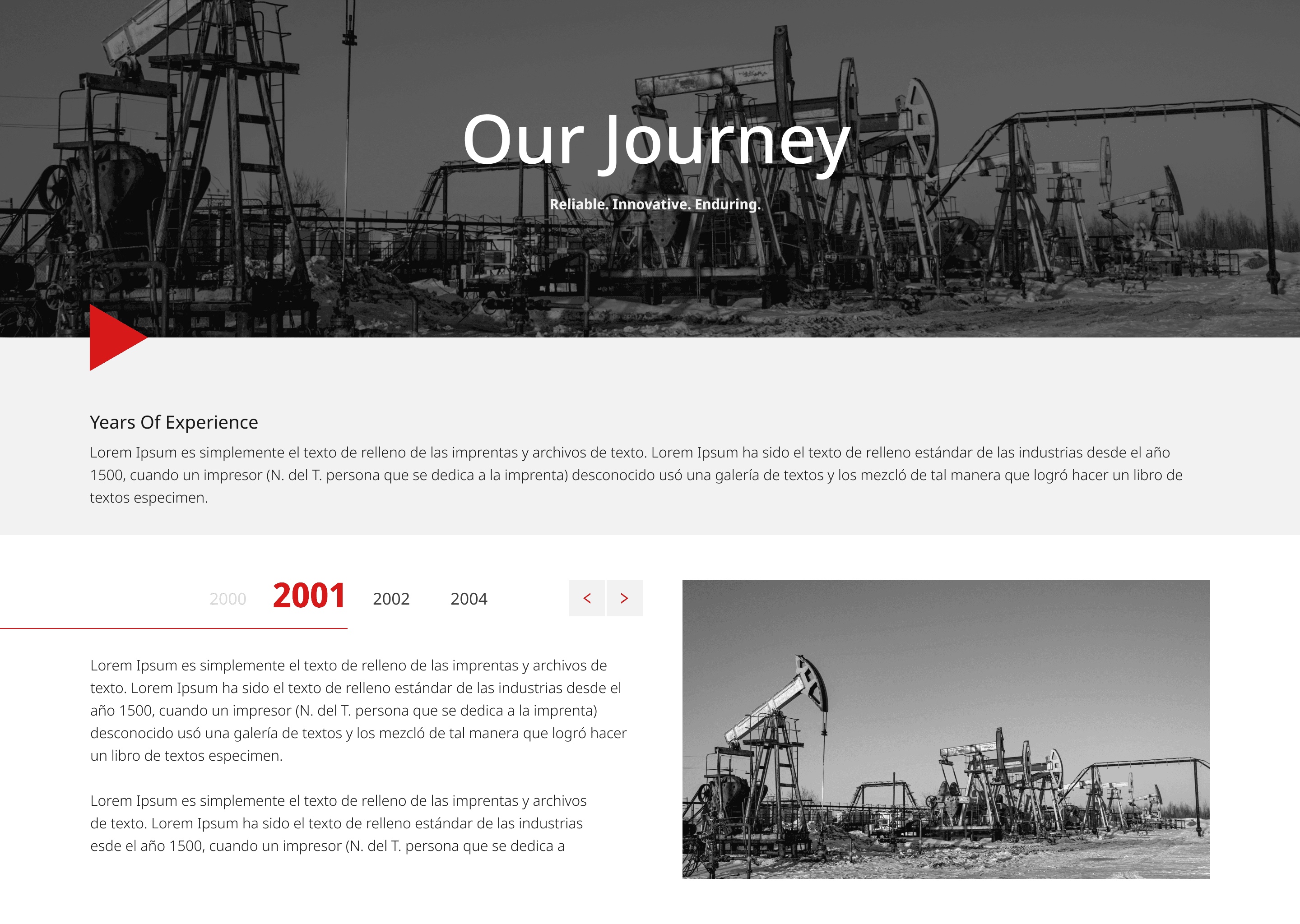


My Takeaways
How did the project help me
Designing for technical fields means presenting complex data in a digestible, visually clean format that doesn’t overwhelm users.
Turning technical jargon into intuitive layouts, structured sections, and clear visuals helps users engage without prior deep expertise.
A professional, uniform look - paired with clear navigation - establishes credibility, especially in B2B industries where decisions carry weight.
Messaging and layout should instantly communicate what the company does - there’s little room for ambiguity in industrial sectors.
Thoughtful, well-written insights and guides not only inform but also position the company as an expert in its domain.
Strong headings, clear typography, and ample white space help users quickly grasp key information—even in long-form content.
How did the project help me
My Takeaways
Function Over Flash in B2B
Engineering audiences value fast access to data, specifications, and brochures over complex micro-interactions or distracting parallax animations.
1
Visual Structure Generates Credibility
In industrial sectors where decisions carry massive financial and safety weight, clean layouts and explicit text directly influence brand authority
2
Clarity Wins
Turning dense technical jargon into digestible UI components ensures that both technical staff and non-technical procurement teams can seamlessly evaluate the business.
3



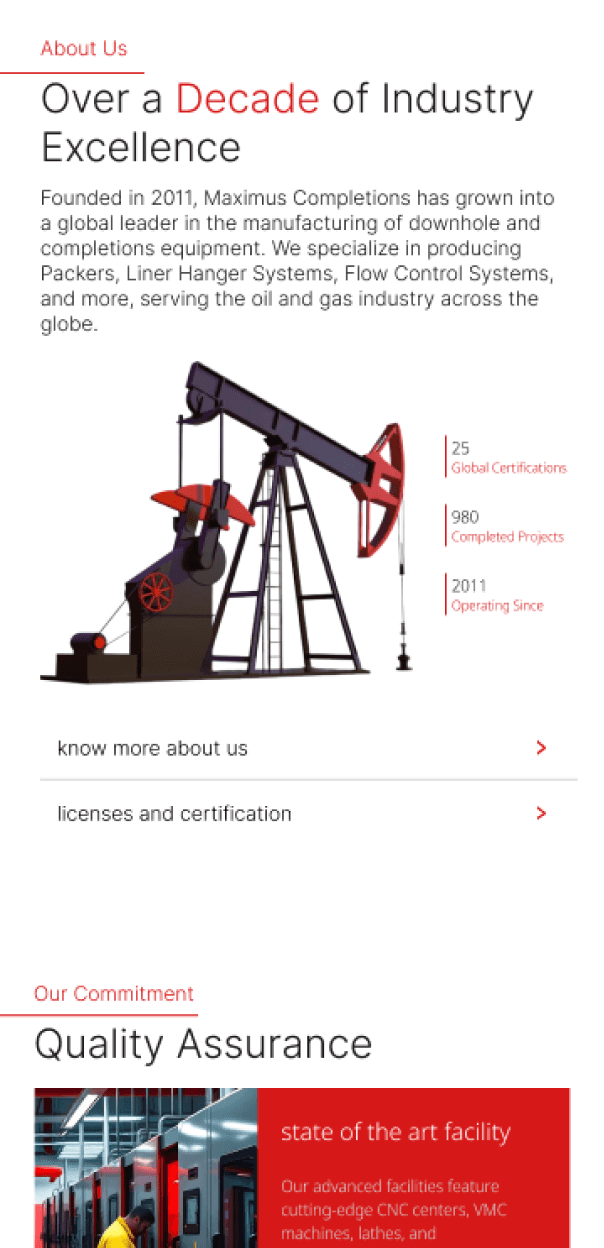
Know the Project
Project Overview & Background
Project Overview & Background
Maximus Oil & Gas is a leading energy-sector brand specializing in precision-driven industrial engineering and completion systems. Despite their industry expertise, their legacy web presence was outdated, struggled with complex navigation, and failed to clearly demonstrate their technical capabilities to B2B decision-makers and field technicians.
Maximus Oil & Gas is a leading energy-sector brand specializing in precision-driven industrial engineering and completion systems. Despite their industry expertise, their legacy web presence was outdated, struggled with complex navigation, and failed to clearly demonstrate their technical capabilities to B2B decision-makers and field technicians.
Lead UX/UI Designer: Research, IA, Interaction, Optimization
▷
Timeline - 6 Weeks
▷
Tools : Figma
▷
The Challenge & Project Goals
The Purpose
Industrial B2B websites often suffer from "information overload." The primary challenge was translating highly technical engineering jargon and a vast product catalog into a clean, intuitive, and high-converting interface without losing the brand's core sense of "engineering rigor."
Establish Modern Credibility: Upgrade the visual identity to reflect strength, reliability, and precision.
Simplify Complex Information: Make technical services, spec sheets, and product diagrams easy to consume.
Improve Accessibility & Responsiveness: Ensure field engineers on mobile devices can access data just as easily as executives in a boardroom.
Drive Business Growth: Streamline the user journey to increase quote requests and asset downloads.
UI & Interaction Strategy (Key Decisions)
UI & Interaction Strategy
The Purpose
Key Decisions
Every aesthetic choice was rooted in psychological trust and industrial functionality:
Every aesthetic choice was rooted in psychological trust and industrial functionality:
Every aesthetic choice was rooted in psychological trust and industrial functionality:
Establish Modern Credibility: Upgrade the visual identity to reflect strength, reliability, and precision.
Establish Modern Credibility: Upgrade the visual identity to reflect strength, reliability, and precision.
Simplify Complex Information: Make technical services, spec sheets, and product diagrams easy to consume.
Simplify Complex Information: Make technical services, spec sheets, and product diagrams easy to consume.
Improve Accessibility & Responsiveness: Ensure field engineers on mobile devices can access data just as easily as executives in a boardroom.
Improve Accessibility & Responsiveness: Ensure field engineers on mobile devices can access data just as easily as executives in a boardroom.
Drive Business Growth: Streamline the user journey to increase quote requests and asset downloads.
Drive Business Growth: Streamline the user journey to increase quote requests and asset downloads.
Color Psychology: A dominant palette of Red, Black, and Gray. Red functions as a high-contrast accent color to draw immediate attention to critical Call-to-Actions (CTAs) and navigation cues, while black and gray evoke industrial strength.
Color Psychology: A dominant palette of Red, Black, and Gray. Red functions as a high-contrast accent color to draw immediate attention to critical Call-to-Actions (CTAs) and navigation cues, while black and gray evoke industrial strength.
#E62B15
#E62B15
#222222
#222222
#585858
#585858
Utilitarian Typography: Selected Noto Sans for its exceptional readability across various screen resolutions, keeping line weights distinct to guide technical audiences through long-form content.
Utilitarian Typography: Selected Noto Sans for its exceptional readability across various screen resolutions, keeping line weights distinct to guide technical audiences through long-form content.
Noto Sans
Noto Sans
Geometric Precision Layouts: Used structured, grid-based layouts with sharp, precise edges to subtly mirror mechanical engineering designs (pipework, flow diagrams, waveforms).
Geometric Precision Layouts: Used structured, grid-based layouts with sharp, precise edges to subtly mirror mechanical engineering designs (pipework, flow diagrams, waveforms).
Product-First Visuals: Isolated, high-quality imagery of tangible industry assets (valves, packers) grounds the website in real-world application, eliminating generic corporate stock photography.
Product-First Visuals: Isolated, high-quality imagery of tangible industry assets (valves, packers) grounds the website in real-world application, eliminating generic corporate stock photography.
Matrix of Key Decisions & Actions
The Impact
UX Problem / Gap Identified
UX Metric Impacted
Key Design Decision
Concrete Action Taken
High Friction Quote Process: Users struggled to find how to contact sales for specific parts.
Conversion Rate
Task Completion Time
Implement a Streamlined Mega Menu and sticky, high-contrast CTA pathways.
Designed a "Get Appointment/Quote" button using the high-contrast red accent color; mapped clear labels directly to individual product lines.
Dense Technical Overload: Product pages were overwhelming, causing users to drop off.
Bounce Rate
Time on Page
Adopt a Boxy, Modular Component Pattern using card layouts to bucket data.
Organized data into isolated, collapsible sections for specs, brochures, and downloads, minimizing cognitive load.
Poor Field Usability: Technicians couldn't read spec sheets on mobile devices at worksites.
Mobile Engagement Rate
Accessibility (ADA Contrast)
Prioritize a Mobile-First Responsive Framework with strict high-contrast ratios.
Optimized all visuals and tables for fast loading speeds; applied stark black/white text contrast on gray backgrounds for readability under sunlight.
Weak Brand Trust: Legacy site lacked immediate proof of safety and modern capabilities.
Trust & Credibility Perception
Elevate Safety, Quality Assurance, and Certifications to top-tier status.
Created dedicated, highly visible pages for Certificates, Sustainability, and "State of the Art Facility" highlights directly in the main navigation.
Phase 1
User Research & Competitive Analysis
User Research & Competitive Analysis
We benchmarked key competitors in the energy sector and evaluated the expectations of two distinct primary user personas:
We benchmarked key competitors in the energy sector and evaluated the expectations of two distinct primary user personas:
The Corporate Decision-Maker (Procurement/VP):
The Corporate Decision-Maker (Procurement/VP):
▷
Needs immediate validation of safety standards, company capability, certifications, and a quick path to request quotes.
Needs immediate validation of safety standards, company capability, certifications, and a quick path to request quotes.
The Field Engineer/Technician:
The Field Engineer/Technician:
▷
Needs rapid access to product dimensions, manuals, and technical specifications while working on-site, often under harsh lighting or limited bandwidth.
Needs rapid access to product dimensions, manuals, and technical specifications while working on-site, often under harsh lighting or limited bandwidth.
The Field Engineer/Technician:
▷
Needs rapid access to product dimensions, manuals, and technical specifications while working on-site, often under harsh lighting or limited bandwidth.
Phase 2
Information Architecture (IA) & Restructuring
Information Architecture (IA) & Restructuring
The legacy sitemap was fragmented. We consolidated the massive product portfolio into structured, modular product lines.
The legacy sitemap was fragmented. We consolidated the massive product portfolio into structured, modular product lines.
The Corporate Decision-Maker (Procurement/VP):
▷
Needs immediate validation of safety standards, company capability, certifications, and a quick path to request quotes.
The Field Engineer/Technician:
▷
Needs rapid access to product dimensions, manuals, and technical specifications while working on-site, often under harsh lighting or limited bandwidth.
Sitemap
Sitemap
Sitemap
Homepage
Homepage
Homepage
Certificates
Certificates
Certificates
Contact us
Contact us
Contact us
Packer system
Packer system
Packer system
Flow control system
Flow control system
Flow control system
Cast iron products
Cast iron products
Cast iron products
Liner hanger system
Liner hanger system
Liner hanger system
Casing cementing accessories
Casing cementing accessories
Casing cementing accessories
Tubing anchor system
Tubing anchor system
Tubing anchor system
Hammer unions
Hammer unions
Hammer unions
Sealing & packing components
Sealing & packing components
Sealing & packing components
In the news
In the news
In the news
Blogs
Blogs
Blogs
Events
Events
Events
News & Insights
News & Insights
News & Insights
In the news
In the news
In the news
Blogs
Blogs
Blogs
Events
Events
Events
Product Line
Product Line
Product Line
Company
Company
Company
Who we are
Who we are
Who we are
About the Company
About the Company
About the Company
L & C
L & C
L & C
Leadership & team
Leadership & team
Leadership & team
Quality Assurance
Quality Assurance
Quality Assurance
State of the Art Facility
State of the Art Facility
State of the Art Facility
Committment to Quality
Committment to Quality
Committment to Quality
sustainable to Quality
sustainable to Quality
sustainable to Quality
MEGA MENU
MEGA MENU
MEGA MENU
Impact & Business Outcomes
How did I help
Redesign
Redesign
Brand Modernization
Brand Modernization
Brand Modernization
Replaced outdated elements with a sleek interface that matches the brand’s actual physical engineering footprint.
Replaced outdated elements with a sleek interface that matches the brand’s actual physical engineering footprint.
Replaced outdated elements with a sleek interface that matches the brand’s actual physical engineering footprint.
CTA
CTA
Business-Ready UX
Business-Ready UX
Business-Ready UX
The direct, simplified layout and optimized CTAs shortened the sales cycle, leading to an increase in qualified inbound quote requests.
The direct, simplified layout and optimized CTAs shortened the sales cycle, leading to an increase in qualified inbound quote requests.
The direct, simplified layout and optimized CTAs shortened the sales cycle, leading to an increase in qualified inbound quote requests.
Responsive
Responsive
True Cross-Platform Access
True Cross-Platform Access
True Cross-Platform Access
The responsive design bridged the gap between office-bound corporate executives and field-active operations teams.
The responsive design bridged the gap between office-bound corporate executives and field-active operations teams.
The responsive design bridged the gap between office-bound corporate executives and field-active operations teams.
Flexible
Flexible
Scalable Foundation
Scalable Foundation
Scalable Foundation
Built a flexible, modern platform ready for SEO, analytics, and future growth.
Built a flexible, modern platform ready for SEO, analytics, and future growth.
Built a flexible, modern platform ready for SEO, analytics, and future growth.
My Takeaways
How did the project help me
Function Over Flash in B2B
Function Over Flash in B2B
Function Over Flash in B2B
Engineering audiences value fast access to data, specifications, and brochures over complex micro-interactions or distracting parallax animations.
Engineering audiences value fast access to data, specifications, and brochures over complex micro-interactions or distracting parallax animations.
Engineering audiences value fast access to data, specifications, and brochures over complex micro-interactions or distracting parallax animations.
1
2
Visual Structure Generates Credibility
Visual Structure Generates Credibility
Visual Structure Generates Credibility
In industrial sectors where decisions carry massive financial and safety weight, clean layouts and explicit text directly influence brand authority
In industrial sectors where decisions carry massive financial and safety weight, clean layouts and explicit text directly influence brand authority
In industrial sectors where decisions carry massive financial and safety weight, clean layouts and explicit text directly influence brand authority
Clarity Wins
Clarity Wins
Clarity Wins
Turning dense technical jargon into digestible UI components ensures that both technical staff and non-technical procurement teams can seamlessly evaluate the business.
Turning dense technical jargon into digestible UI components ensures that both technical staff and non-technical procurement teams can seamlessly evaluate the business.
Turning dense technical jargon into digestible UI components ensures that both technical staff and non-technical procurement teams can seamlessly evaluate the business.
3

MAXIMUS
ENGITECH
+91 9900583810
get an appointment

Redesigning Maximus Oil & Gas
Transforming Complex Industrial Data into an Intuitive, Field-Accessible Digital Presence
MAXIMUS
ENGITECH
+91 9900583810
get an appointment
Products Page
Products Page
Products Page
About Us Page
About Us Page
About Us Page


The Challenge & Project Goals
The Purpose
Industrial B2B websites often suffer from "information overload." The primary challenge was translating highly technical engineering jargon and a vast product catalog into a clean, intuitive, and high-converting interface without losing the brand's core sense of "engineering rigor."
Industrial B2B websites often suffer from "information overload." The primary challenge was translating highly technical engineering jargon and a vast product catalog into a clean, intuitive, and high-converting interface without losing the brand's core sense of "engineering rigor."
Establish Modern Credibility: Upgrade the visual identity to reflect strength, reliability, and precision.
Establish Modern Credibility: Upgrade the visual identity to reflect strength, reliability, and precision.
Simplify Complex Information: Make technical services, spec sheets, and product diagrams easy to consume.
Simplify Complex Information: Make technical services, spec sheets, and product diagrams easy to consume.
Improve Accessibility & Responsiveness: Ensure field engineers on mobile devices can access data just as easily as executives in a boardroom.
Improve Accessibility & Responsiveness: Ensure field engineers on mobile devices can access data just as easily as executives in a boardroom.
Drive Business Growth: Streamline the user journey to increase quote requests and asset downloads.
Drive Business Growth: Streamline the user journey to increase quote requests and asset downloads.
UI & Interaction Strategy
Key Decisions
Every aesthetic choice was rooted in psychological trust and industrial functionality:
Establish Modern Credibility:
Upgrade the visual identity to reflect strength, reliability, and precision.
Simplify Complex Information:
Make technical services, spec sheets, and product diagrams easy to consume.
Improve Accessibility & Responsiveness:
Ensure field engineers on mobile devices can access data just as easily as executives in a boardroom.
Drive Business Growth:
Streamline the user journey to increase quote requests and asset downloads.
Color Psychology: A dominant palette of Red, Black, and Gray. Red functions as a high-contrast accent color to draw immediate attention to critical Call-to-Actions (CTAs) and navigation cues, while black and gray evoke industrial strength.
#E62B15
#222222
#585858
Utilitarian Typography: Selected Noto Sans for its exceptional readability across various screen resolutions, keeping line weights distinct to guide technical audiences through long-form content.
Noto Sans
Noto Sans
Geometric Precision Layouts: Used structured, grid-based layouts with sharp, precise edges to subtly mirror mechanical engineering designs (pipework, flow diagrams, waveforms).
Product-First Visuals: Isolated, high-quality imagery of tangible industry assets (valves, packers) grounds the website in real-world application, eliminating generic corporate stock photography.