

1. The Problem

  1. The Problem

BrainStrata: Building an AI-Driven Learning Ecosystem from Zero to One

BrainStrata: Building an AI-Driven Learning Ecosystem from Zero to One

Designing an autonomous AI learning ecosystem that replaces one-on-one tutoring — built on the psychology of how humans actually learn.

Designing an autonomous AI learning ecosystem that replaces one-on-one tutoring built on the psychology of how humans actually learn.

Role

Lead Product Designer

Role

Lead Product Designer

Platform

Web (Responsive)

Platform

Web (Responsive)

Market

UK K–12 (KS3, GCSE, A-Level)

Market

UK K–12 (KS3, GCSE, A-Level)

Scope

End-to-End · 0 → 1

Scope

End-to-End · 0 → 1

Check Website

The Problem

The mid-2010s ed-tech boom promised democratized learning. It delivered content marketplaces, Passive video libraries, Exhausting live-class schedules, Platforms that host content, not teach it.

The mid-2010s ed-tech boom promised democratized learning. It delivered content marketplaces, Passive video libraries, Exhausting live-class schedules, Platforms that host content, not teach it.

Most ed-tech platforms don't actually teach. They leave parents to foot the bill for expensive human tutors — or act as makeshift project managers just to keep their kids engaged.

Most ed-tech platforms don't actually teach. They leave parents to foot the bill for expensive human tutors or act as makeshift project managers just to keep their kids engaged.

UK K–12 digital learning is still breaking under structural retention decay, isolation anxiety, and massive drop-off rates. The challenge became undeniable.

UK K–12 digital learning is still breaking under structural retention decay, isolation anxiety, and massive drop-off rates. The challenge became undeniable.

How do we design a self-sustaining, autonomous learning ecosystem that guides a student from curiosity to deep active recall — without relying on one-on-one live instruction?

How do we design a self-sustaining, autonomous learning ecosystem that guides a student from curiosity to deep active recall without relying on one-on-one live instruction?

  1. Competitive Landscape

  1. Competitive Landscape

Every competitor has the same critical blind spot

Every competitor has the same critical blind spot

Every competitor has the same critical blind spot

BBC Bitesize

Free · Curriculum-aligned · 3.8M weekly users

Zero AI personalization. Passive video + quiz content. No contextual support when students get stuck

BrainStrata: AI generates alternative explanations within the lesson no tab switching, no dead ends.

BBC Bitesize

Free · Curriculum-aligned · 3.8M weekly users

Zero AI personalization. Passive video + quiz content. No contextual support when students get stuck

BrainStrata: AI generates alternative explanations within the lesson no tab switching, no dead ends.

Tassomai

Subscription · Adaptive retrieval · GCSE-focused

Text-heavy and visually sparse. Repetitive question sets. Students memorize answers rather than understanding concepts.

BrainStrata: Video-first with AI-generated diagrams ensures conceptual understanding over rote recall.

Duolingo

Freemium · Gamified · 60% Gen Z users

Habit-forming but academically shallow. Gamification distracts from real learning depth. No curriculum alignment.

BrainStrata:Bloom's Taxonomy ensures gamification drives genuine cognitive progression, not just streaks.

IXL Learning

Subscription · Adaptive practice · 17M+ students

Stressful UX, poor navigation, repetitive content. Strong analytics but no support when students hit a wall mid-lesson.

BrainStrata: "Stuck?" panel intercepts frustration in real time removing the need to abandon a session.

Seneca Learning

Freemium · UK exam-aligned · Teacher-led adoption

Over-reliance on MCQs. No AI explanations. Repetitive experience that doesn't serve advanced learners.

BrainStrata: AI generates alternative explanations within the lesson no tab switching, no dead ends.

Think Academy

Live instruction · $35–40/hr per session


The model BrainStrata was built to replace. Expert quality but financially inaccessible, unscalable, and schedule-dependent.

BrainStrata: Delivers comparable contextual support autonomously, at a fraction of the cost, on-demand.

Tassomai

Subscription · Adaptive retrieval · GCSE-focused

Text-heavy and visually sparse. Repetitive question sets. Students memorize answers rather than understanding concepts.

BrainStrata: Video-first with AI-generated diagrams ensures conceptual understanding over rote recall.

Seneca Learning

Freemium · UK exam-aligned · Teacher-led adoption

Over-reliance on MCQs. No AI explanations. Repetitive experience that doesn't serve advanced learners.

BrainStrata: AI generates alternative explanations within the lesson no tab switching, no dead ends.

IXL Learning

Subscription · Adaptive practice · 17M+ students

Stressful UX, poor navigation, repetitive content. Strong analytics but no support when students hit a wall mid-lesson.

BrainStrata: "Stuck?" panel intercepts frustration in real time removing the need to abandon a session.

Duolingo

Freemium · Gamified · 60% Gen Z users


Habit-forming but academically shallow. Gamification distracts from real learning depth. No curriculum alignment.

BrainStrata:Bloom's Taxonomy ensures gamification drives genuine cognitive progression, not just streaks.

Think Academy

Live instruction · $35–40/hr per session

The model BrainStrata was built to replace. Expert quality but financially inaccessible, unscalable, and schedule-dependent.

BrainStrata: Delivers comparable contextual support autonomously, at a fraction of the cost, on-demand.

  1. Competitive Landscape

  1. Competitive Landscape

Every feature maps to Bloom's Taxonomy

Every feature maps to Bloom's Taxonomy

Every feature maps to Bloom's Taxonomy

To serve both a 12-year-old starting secondary school and an anxious 18-year-old cramming for A-Levels, every design decision was grounded in cognitive learning theory not guesswork or convention.

To serve both a 12-year-old starting secondary school and an anxious 18-year-old cramming for A-Levels, every design decision was grounded in cognitive learning theory not guesswork or convention.

Evaluate & Analyze

Evaluate & Analyze

Apply & Retain

Apply & Retain

Understand→ Explanations Hub

Understand→ Explanations Hub

Remember→ Autonomous Course Player

Remember→ Autonomous Course Player

Consume→ Document Ingestion

Consume→ Document Ingestion

↑ Built bottom-up

↑ Built bottom-up

Frictionless Ingestion

Frictionless Ingestion

Students drop in class PDFs and handwritten notes. The system handles categorization entirely. Zero setup fatigue.


Context Preservation

Context Preservation

Flashcards, quizzes, and AI chat load as hot-swappable modules inside the core lesson viewport. Students never leave their focus space.
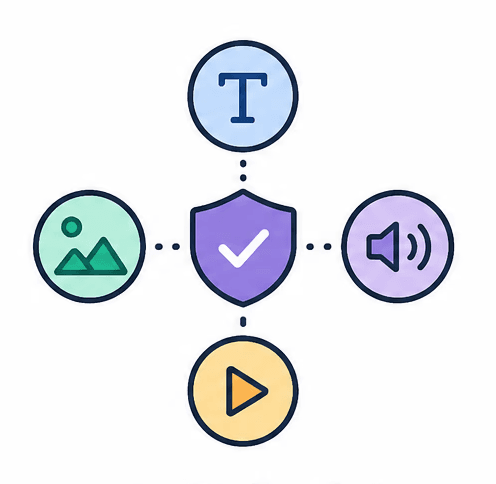
Multi-Modal Redundancy

Multi-Modal Redundancy

Complex topics break into text, diagrams, flowcharts, and analogies simultaneously

because no two brains learn alike.


Complex topics break into text, diagrams, flowcharts, and analogies simultaneously

because no two brains learn alike.

  1. The Messy Middle

  1. The Messy Middle

What user testing actually broke

What user testing actually broke

What user testing actually broke

Before any solution shipped, the platform went through structured user testing sessions. What we found forced a near-complete rethink of how four core features were positioned, named, and integrated.

Before any solution shipped, the platform went through structured user testing sessions. What we found forced a near-complete rethink of how four core features were positioned, named, and integrated.

Finding 01 · Explanations Page

It is not obvious what the feature is for, why a student would use it, or how it fits into their learning journey. The page feels like a standalone tool that exists outside the main product experience.

✦ Design Response

Removed standalone Explanations page. Feature rebuilt as a contextual "Stuck on this?" panel that surfaces inline with the lesson no navigation required.


Finding 02 · Course Page

The course page does not feel like a "home" for the learner's progress. There are no visible metrics no % completed, no last activity, no indicator of where the user left off.

✦ Design Response

Redesigned course pages to surface progress indicators, streak data, time-spent, last viewed lesson, and a "next recommended action" prompt making them a true learning home base.

Finding 03 · Navigation Structure

Features like Flashcards and Create Course feel like tools users might accidentally discover while browsing tabs. Important tools are buried behind multiple clicks and nested navigation.

✦ Design Response

Elevated Flashcards and Create Course to dedicated, top-level navigation items. Each landing page rebuilt with an animated outcome preview so value is obvious before the user commits.

Finding 03 · Navigation Structure

During a session on GCSE Mathematics, the "Get Notes" panel surfaced a PDF titled "Ohm's Law" a physics document. This broke trust in the AI content system immediately.

✦ Design Response

Flagged to engineering as a critical trust-breaking defect. Simultaneously redesigned the feature label from "Get Notes" to "Course Notes" with supporting microcopy clarifying what will be generated.

  1. Design Decisions

  1. Design Decisions

From findings to shipped solutions

From findings to shipped solutions

From findings to shipped solutions

Each design decision below traces directly back to a real testing insight or strategic gap — not aesthetic preference.

Each design decision below traces directly back to a real testing insight or strategic gap — not aesthetic preference.

Phase A · Dashboard

Phase A · Dashboard

Destroying choice paralysis at first login

Destroying choice paralysis at first login

Destroying choice paralysis at first login

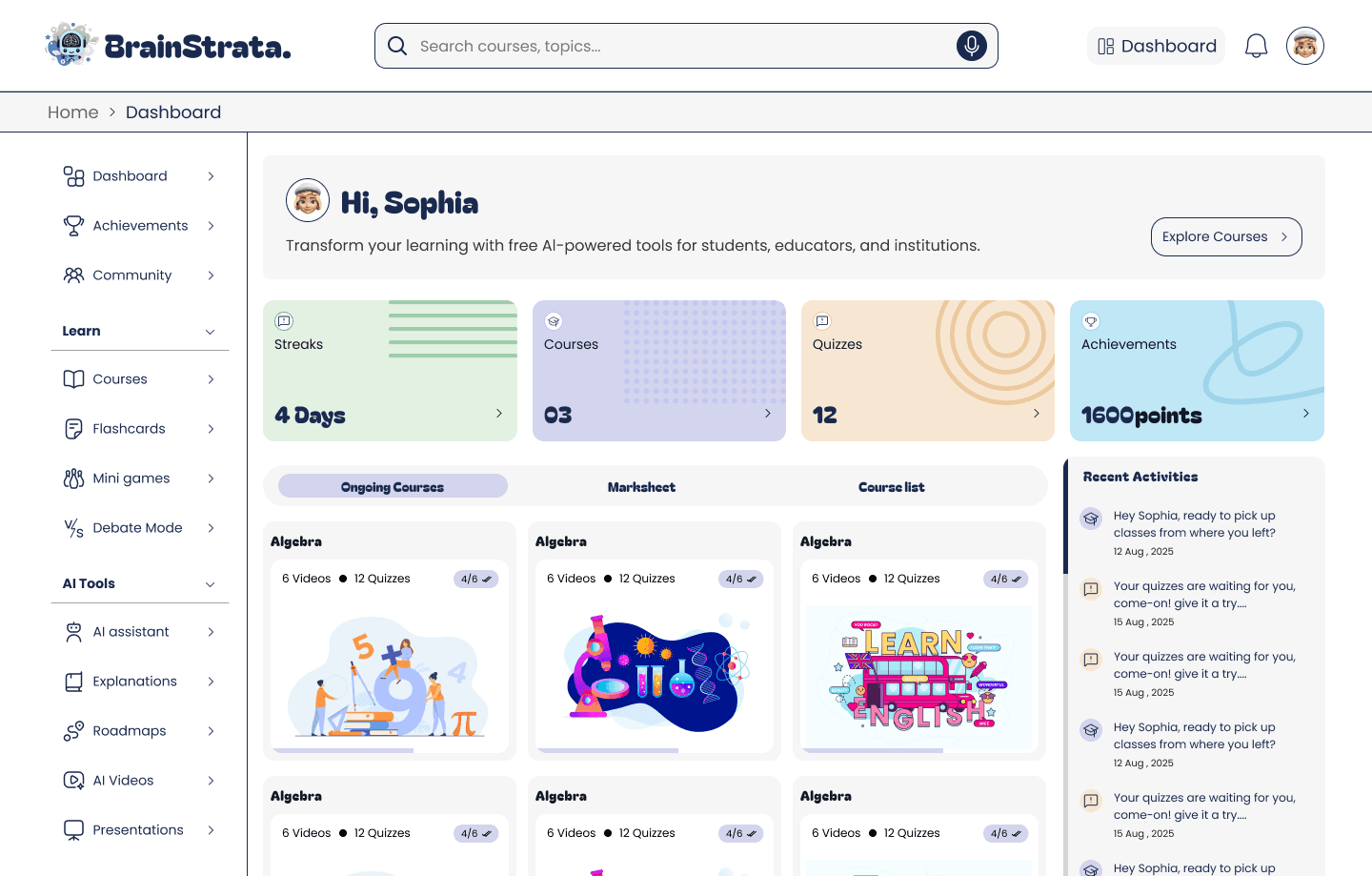
Insight: First-time login created immediate decision fatigue

✦ Design Response


The dashboard splits user intent into two crystal-clear entry points: Create Course (upload your own material) and Explore Courses (start instantly). A persistent streak engine applies the Goal-Gradient Effect establishing a daily micro-commitment loop from the first session. Users don't browse; they have a reason to return.

Phase B · Lesson Environment

Phase B · Lesson Environment

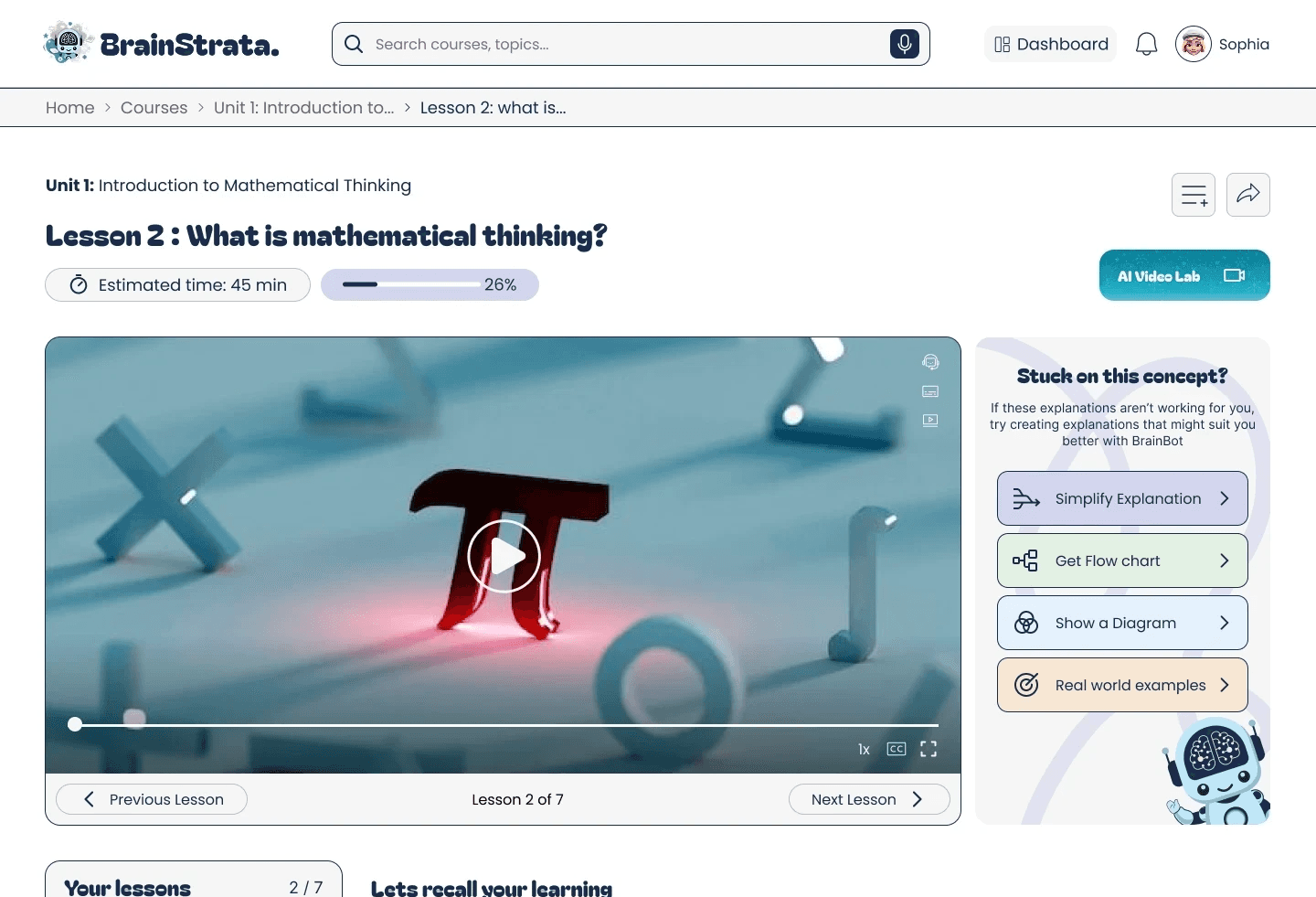
Building the "Stuck?" Safety Net : Contextually

Building the "Stuck?" Safety Net : Contextually

Building the "Stuck?" Safety Net : Contextually

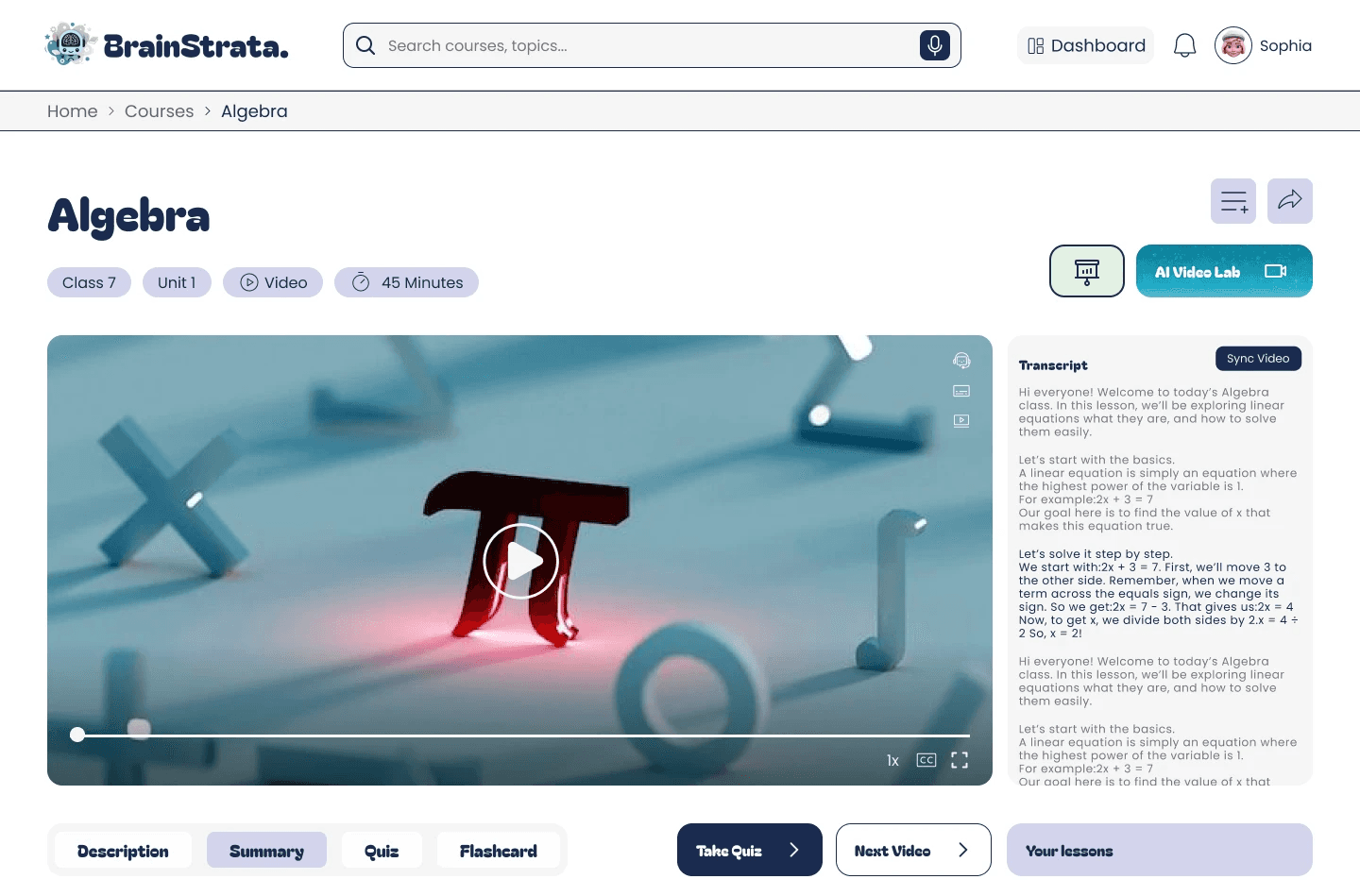
Insight: Standalone Explanations page had near-zero discoverability

✦ Design Response


When testing showed the original Explanations page was invisible to users mid-lesson, I scrapped the standalone approach entirely. The redesigned system surfaces a "Stuck on this concept?" panel inline with the video player. One click no navigation. Macro buttons like "Simplify" or "Get Flowchart" remove the need for students to formulate prompts.
Phase C · Gamification

Phase C · Gamification

Age-Gated Micro-Learning — Without the Baby Talk

Age-Gated Micro-Learning — Without the Baby Talk

Age-Gated Micro-Learning — Without the Baby Talk

Insight: GCSE students felt patronized by generic gamification

✦ Design Response


Gamification in education is a tightrope. Too playful and 17-year-olds preparing for A-Levels disengage; too dry and KS3 students check out. Our Mini Games and Achievements arrays use rigid age-gated content tags (Ages 12+, Ages 15–25). Empty states were redesigned as instructional carousels active, not passive teaching users how to generate content on the fly.
  1. The Architecture of Focus

  1. The Architecture of Focus

Low cognitive load, maximum learning surface

Low cognitive load, maximum learning surface

Low cognitive load, maximum learning surface

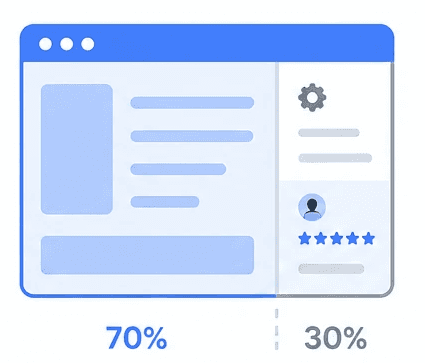
70/30 Layout

70/30 Layout

An intentional 70/30 spatial split. Primary learning content dominates the main canvas. Secondary settings and social proof are anchored right to preserve clean reading rhythms.

An intentional 70/30 spatial split. Primary learning content dominates the main canvas. Secondary settings and social proof are anchored right to preserve clean reading rhythms.

Accessibility Sandboxes

Accessibility Sandboxes

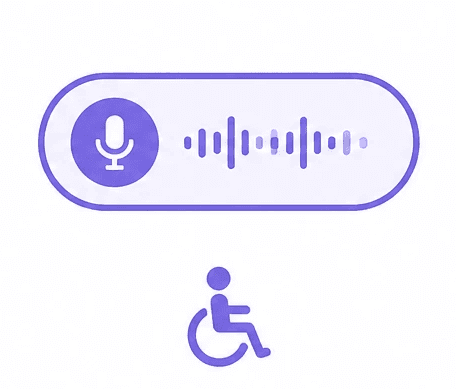
Debate Mode and the Study Assistant feature a persistent Live Voice input pill. Students with learning differences or writing fatigue get a frictionless path to express complex ideas.

Debate Mode and the Study Assistant feature a persistent Live Voice input pill. Students with learning differences or writing fatigue get a frictionless path to express complex ideas.

Micro-Time Budgeting

Micro-Time Budgeting

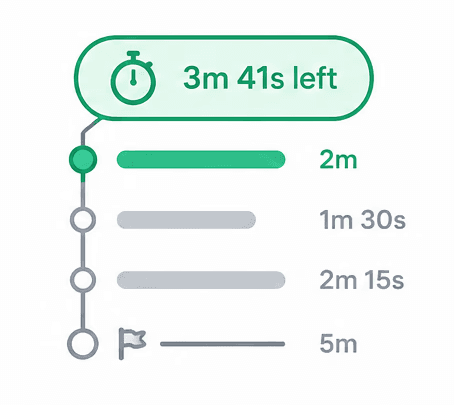
Content trees display explicit runtime trackers ("3m 41s left"). Bite-sized milestone labeling lowers the psychological barrier to starting a study session and finishing one.


Content trees display explicit runtime trackers ("3m 41s left"). Bite-sized milestone labeling lowers the psychological barrier to starting a study session and finishing one.


Content trees display explicit runtime trackers ("3m 41s left"). Bite-sized milestone labeling lowers the psychological barrier to starting a study session and finishing one.

  1. Business Impact

  1. Business Impact

Design decisions that move the bottom line

Design decisions that move the bottom line

Design decisions that move the bottom line

Every interaction was deliberately architected to drive measurable product health. Quantified metrics are pending confirmation from the marketing team this section will be updated post-launch review.

Every interaction was deliberately architected to drive measurable product health. Quantified metrics are pending confirmation from the marketing team this section will be updated post-launch review.

Engagement Strategy

Engagement Strategy

From browsable app to irreplaceable tool Body:


Every document a student uploads class notes, past papers, revision material becomes part of their personal academic repository.


The more they build inside BrainStrata, the more painful it becomes to leave. This is intentional stickiness by design, not by lock-in.

From browsable app to irreplaceable tool Body:


Every document a student uploads class notes, past papers, revision material becomes part of their personal academic repository.


The more they build inside BrainStrata, the more painful it becomes to leave. This is intentional stickiness by design, not by lock-in.

"Features hidden in nested tabs had near-zero engagement in testing. Elevating them to dedicated nav items was the first step toward making them habits."

"Features hidden in nested tabs had near-zero engagement in testing. Elevating them to dedicated nav items was the first step toward making them habits."

Retention Strategy

Retention Strategy

Catching the moment students quit Body:


User testing showed a clear pattern when students hit a concept they didn't understand, they didn't search for help.


They closed the app. The contextual "Stuck?" panel was designed specifically to intercept that exact moment, before it became a cancellation.


Catching the moment students quit Body:


User testing showed a clear pattern when students hit a concept they didn't understand, they didn't search for help.


They closed the app. The contextual "Stuck?" panel was designed specifically to intercept that exact moment, before it became a cancellation.


"Zero of five testers discovered the original Explanations page during an active lesson. After the contextual redesign, all five used it without prompting."

"Zero of five testers discovered the original Explanations page during an active lesson. After the contextual redesign, all five used it without prompting."

Growth Strategy

Growth Strategy

The community builds itself Body:


Study groups mapped to real UK exam boards (AQA, Edexcel, OCR) mean students are not joining a generic forum they are joining their exact syllabus cohort.


When one student invites a classmate, the platform gains a pre-qualified user at zero acquisition cost.


The community builds itself Body:


Study groups mapped to real UK exam boards (AQA, Edexcel, OCR) mean students are not joining a generic forum they are joining their exact syllabus cohort.


When one student invites a classmate, the platform gains a pre-qualified user at zero acquisition cost.


"BBC Bitesize reaches 3.8M weekly users through broadcast ecosystems. BrainStrata's growth lever is the classroom network already assembled, just waiting to be activated."

"BBC Bitesize reaches 3.8M weekly users through broadcast ecosystems. BrainStrata's growth lever is the classroom network already assembled, just waiting to be activated."

Retention Strategy

Catching the moment students quit Body:


User testing showed a clear pattern when students hit a concept they didn't understand, they didn't search for help.


They closed the app. The contextual "Stuck?" panel was designed specifically to intercept that exact moment, before it became a cancellation.


"Zero of five testers discovered the original Explanations page during an active lesson. After the contextual redesign, all five used it without prompting."

Check Website

Check Website

Create a free website with Framer, the website builder loved by startups, designers and agencies.